What is Google Business Profile? The Complete Beginner’s Guide (2026)
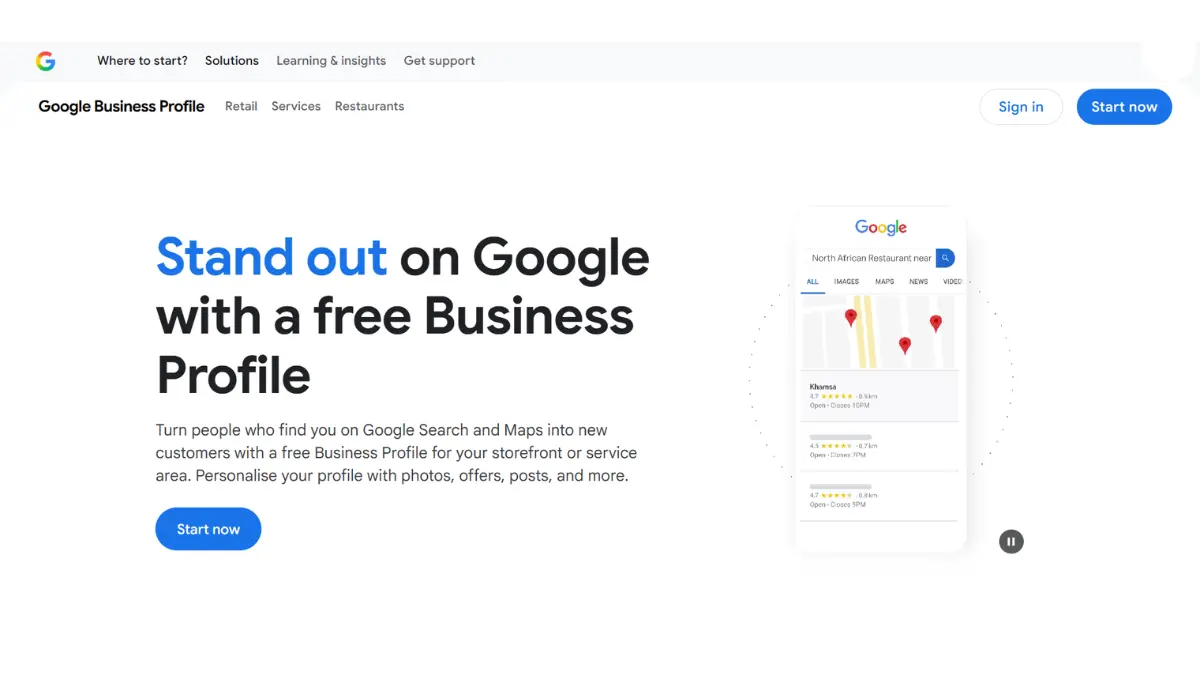
If you have ever searched for a restaurant, salon, or local service provider on Google and noticed a panel with star ratings, photos, and a call button appear instantly, that is Google Business Profile in action.
For local business owners, freelancers, and digital marketers in India and beyond, understanding what is Google Business Profile, the first step to building real online visibility. It’s completely free, incredibly powerful, and directly impacts how you appear in Google Search and Google Maps.
In this complete guide by MarketYug, we break down everything you need to know from the very basics to advanced optimization strategies so your business can attract more customers and rank higher in local search results in 2026.
What is Google Business Profile?
Google Business Profile (GBP) is a free tool from Google that helps businesses and organizations manage their presence on Google Search and Google Maps. When someone searches for your business name or a similar type of business in a specific location, your Google Business Profile appears in the local search results.
Think of it as your business’s official digital identity card on the most popular search engine. It displays your business name, address, phone number, website, operating hours, customer reviews, photos, products, and more, all in one clear panel before users click any links.
Who should use Google Business Profile? It’s perfect for local businesses with a physical storefront, like restaurants, salons, and clinics. It’s also suitable for service-area businesses such as plumbers and electricians who go to customers, freelancers and consultants working with local clients, and digital marketing agencies like MarketYug managing multiple client listings.
Your profile shows up in two main places: the Google Search Knowledge Panel on desktop and mobile search results, and Google Maps, where local customers often look for nearby options. Having a verified and well-organized profile in both places is key to local SEO success.
What is Google My Business? (The Old Name Explained)
If you have heard the term Google My Business or its short form GMB, you are not alone. Millions of business owners, marketers, and bloggers around the world still use this name every day. Google My Business was the original name for this tool, which Google first launched in 2014 to help businesses manage their local presence in Search and Maps.
In November 2021, Google officially changed the name from Google My Business to Google Business Profile. The reason for the rebrand was to make things simpler. Google aimed to streamline the management experience, allowing business owners to manage their listings directly through Google Search for their business name or Google Maps.
So when someone asks what Google My Business is, the best answer is that it is the same product as Google Business Profile, just with a different name. All the main features, listings, reviews, posts, photos, and insights remained the same. Only the name and the management interface changed.
At MarketYug, we always use the updated term Google Business Profile in all our SEO strategies and client communications, as Google has completely retired the old branding on its official platforms.
How Google Business Profile Works
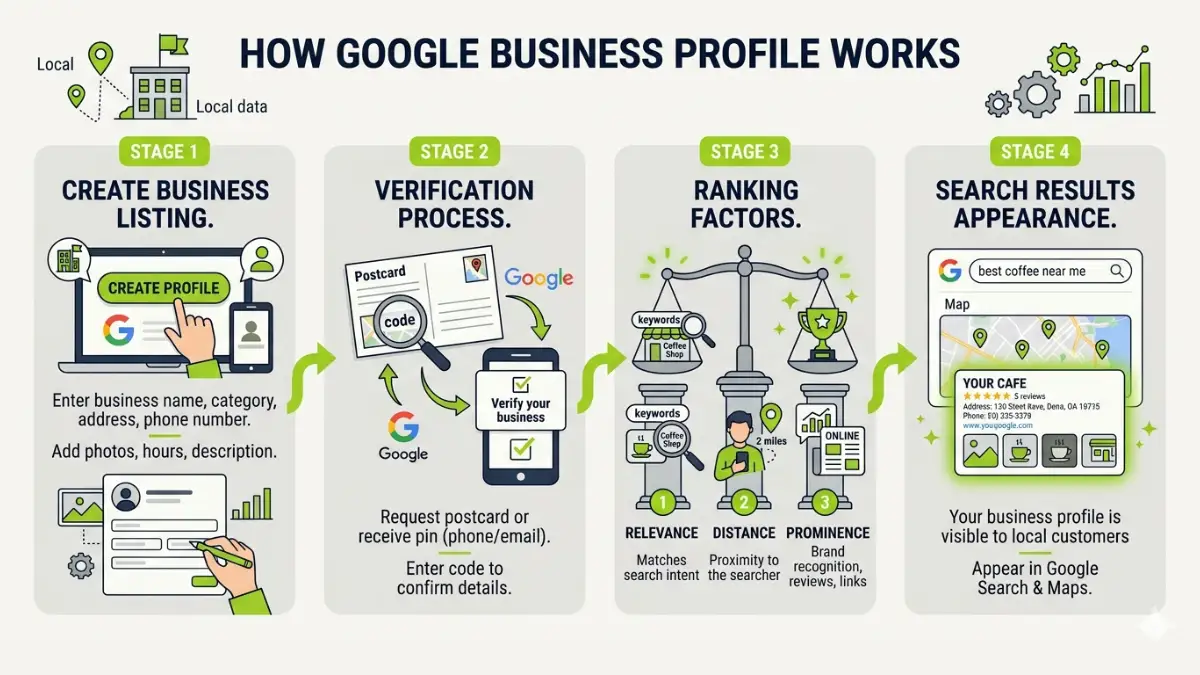
Understanding how Google Business Profile works helps you use it more effectively. The process has three main stages: creating your listing, verifying your business identity, and continuously improving your profile to rank higher in local search results.
Stage 1 – Listing Creation
You create your profile by visiting business.google.com and entering key business details: name, category, address or service area, phone number, website URL, and operating hours. Google uses this information to match your business with relevant local search queries in real time.
Stage 2 – Verification
Google requires every business to verify its listing before it goes live. Verification proves that your business is real and that the information you provided is correct. Depending on your business type, you can verify via a postcard sent to your registered address (most common), a phone call, email, or a short video. Once verified, your profile becomes publicly visible on Google Search and Maps.
Stage 3 – Local Ranking Algorithm
Google uses three main signals to determine how your profile ranks in local search results. Relevance indicates how well your profile matches what the searcher is looking for. That’s why your category, description, and services need to be fully completed. Distance measures how close your business is to the searcher’s location or the location mentioned in their query. Prominence shows how well-known and trusted your business is online, based on your reviews, their quality, website authority, and overall web presence. Keeping your profile complete, active, and regularly updated can improve performance across all three signals.
Key Features of Google Business Profile
Google Business Profile is much more than just a basic directory listing. It is a rich, multi-feature platform that, when fully utilized, can serve as a complete local marketing hub. Here’s a detailed overview of each key feature:
Business Information (NAP)
NAP stands for Name, Address, and Phone Number. These three details are the foundation of your listing and must be correct, consistent, and the same across your GBP profile, website, and every other online directory. NAP consistency is a basic local SEO signal; any differences can harm your local authority in Google’s view.
Reviews and Ratings
Customers can leave star ratings and written reviews directly on your Google Business Profile. Reviews are among the strongest trust signals for both potential customers and Google’s local ranking system. Responding to every review, thanking customers for positive feedback, and professionally addressing negative comments shows engagement and builds trust.
Photos and Videos
Businesses can upload high-quality images of their storefront, interiors, products, team members, and completed work. Data shows that profiles with photos receive significantly more direction requests and website clicks than those without. It also allows customers to upload their own photos, adding real social proof that further builds trust.
Google Posts
Google Posts let you share updates, promotional offers, events, and new product announcements directly on your profile. These posts appear in your Knowledge Panel in search results and are visible for seven days. Regular posting sends a strong activity signal to Google’s algorithm and keeps your profile relevant and engaging for visitors.
Messaging
With messaging enabled, customers can contact your business directly through Google Search or Maps without visiting your website. This makes your business more accessible to high-intent searchers, driving more qualified leads at no extra cost.
Insights and Analytics
GBP Insights provides detailed data on how customers find and interact with your profile. You can see whether customers found you through a direct search (they searched your business name) or a discovery search (they searched a category or keyword), what actions they took (calls, website visits, direction requests), and how your photos are performing compared to similar businesses. At MarketYug, we use these insights to refine local SEO strategies for our clients every month.
Benefits of Google Business Profile for Businesses
The benefits of Google Business Profile are extensive and measurable. Here’s why every local business should have an optimized GBP:
- Improves Local SEO Rankings: A fully optimized Google Business Profile is one of the single most significant factors for your local SEO rankings, which means a direct improvement in chances to show up on the sought-after Local Pack—the first three businesses shown above local search results.
- Builds Trust Through Reviews: Positive and relevant reviews are instant proof of your credibility. Those businesses having active profile pages with lots of reviews always outrank their competitors without any.
- Drives Website Traffic and Phone Calls: With your profile being linked to the main website and having a clickable phone call button, the visitors have an opportunity to reach you directly, without losing much time and decreasing bounce rates.
- Increases Foot Traffic: Physical retail stores can see a direct increase in footfall and walk-in traffic by ensuring that their Google Business Profile is fully optimized with proper navigation and business timings.
- Free and Cost-Effective: Unlike Google Ads or social media ads, Google Business Profile costs nothing to create or maintain. It delivers consistent, organic visibility without any advertising budget — making it one of the highest ROI tools available to small businesses.
- Competitive Edge: As opposed to Google Ads or other forms of social media marketing, setting up a Google Business Profile is absolutely free. There are no expenses whatsoever associated with using this marketing strategy.
How to Create a Google Business Profile (Step-by-Step)
Creating your Google profile requires only basic steps. Here’s how to get your business listed on Google through seven easy steps:
- Visit business.google.com and log in to your Google account. If you don’t have an account, make one for yourself.
- Click “Manage now” and enter your business name. Should your business name be in the suggestion box, claim it. Otherwise, click “Add your business to Google.”
- Choose your business category from Google’s drop-down menu. This is an important step because your category will determine your listing’s triggers. Thus, ensure that your category description is accurate.
- Enter your location if you have a physical store that customers can visit. Otherwise, define your services’ geographic reach (city, region, or radius) or include both options if appropriate.
- Input your telephone number and website URL. These are crucial fields because they encourage customers who read your listing to take immediate action.
- Verify your business with any means that Google suggests based on your business category. Your profile won’t be published unless verified.
- Having ensured the accuracy of the information, the next step is to immediately optimize the profile by adding a description filled with keywords, photos, and services or products offered, as well as opening up your account for communication.
According to MarketYug, you should fill in all available fields when setting up your page. Google even praises profiles that contain all the necessary information.
How to Optimize Google Business Profile for Better Rankings
The final stage after completing your Google Business Profile is learning how to optimize your Google Business Profile. Some of the best Google Business Profile optimization tips include:
Write a Keyword-Rich Business Description
Your business description (up to 750 characters) is prime real estate for your most important keywords. Write naturally and clearly about what your business does, who it serves, and what sets you apart. Include your primary keyword in Google Business Profile where relevant, along with location-specific terms and service keywords. Avoid stuffing; write for your reader first.
Upload High-Quality Photos Every Week
Consistent photo uploads are one of the most overlooked optimization tactics. Add new interior and exterior shots, product photos, team images, and event photos at least once per week. Fresh photo activity signals to Google that your business is active and engaged, which positively impacts your local ranking.
Actively Collect and Respond to Reviews
Make it a process to ask every satisfied customer to leave a Google review. Send a follow-up message with your direct review link. Respond to every single review, both positive and negative. Respond to every review, whether positive or negative. Review velocity (consistently receiving new reviews over time) is a powerful and often overlooked ranking signal.
Post Weekly Google Updates
Use the Posts feature to publish weekly updates about promotions, new arrivals, events, or useful tips. Since posts expire after seven days, regularity is essential. Consistent posting keeps your profile fresh and gives searchers a reason to engage with your listing directly in the results.
Maintain NAP Consistency Across All Platforms
Audit your business name, address, and phone number across Google Business Profile, your website, social media profiles, and online directories like Justdial and IndiaMART. Any inconsistency weakens your local SEO signals. Use the same format everywhere.
List All Services and Products
Add every service or product your business offers, complete with clear titles, detailed descriptions, and prices where applicable. This adds substantial keyword-rich content to your profile and helps Google match your business to longer, more specific search queries — capturing high-intent traffic you might otherwise miss.
Google Business Profile Ranking Factors
Understanding the factors that influence Google Business Profile rankings helps you focus your efforts and spend your time where it matters most for local search visibility.
Relevance: This refers to how well your profile matches the intent and keywords of a search query. Filling out your category, subcategories, business description, and service listings improves relevance. The more specific and complete your profile is, the better Google understands what you offer.
Distance: How physically close your business is to the searcher or the location specified in their query. You cannot move your business to rank better, but expanding your service area settings and mentioning neighborhoods or nearby cities in your description can improve visibility across a wider geographic area.
Prominence: This indicates how well-known and trusted your business is, both online and offline. It is influenced by the number and quality of your reviews, the number of web citations and backlinks to your business, your overall domain authority, and your mentions online. A strong online reputation boosts your prominence.
Profile Completeness: Google tends to favour profiles that include all sections, such as operating hours, photos, services, website, description, attributes, and Q&A. An incomplete profile gives weaker signals and tends to rank lower than a complete competitor listing.
Review Signals: The quantity, quality, recency, and response rate of your reviews all play a role in your local ranking. Consistent and recent reviews from real customers signal trustworthiness and active customer engagement, both of which Google rewards.
Behavioural Signals: Click-through rates, calls, direction requests, and website visits generated from your GBP listing are strong signals to Google that your profile is relevant and valuable to searchers. Higher engagement is often linked to better local rankings.
Common Google Business Profile Problems and How to Fix Them
Profile Not Showing in Search: Make sure your profile is fully verified and all required fields are filled out. Profiles with missing information get lower priority. Newly verified profiles might take one to three weeks to appear consistently in search results.
Verification Issues: If your verification postcard doesn’t arrive within 14 days, request a new one through your GBP dashboard. If your business type cannot use postcard verification, check for phone, email, or video options, which are now more widely available.
Profile Suspended: Suspensions usually happen due to policy violations like using keyword-filled business names, listing a virtual office as a physical address, or showing a home address for a service-area business. Carefully review Google’s Business Profile guidelines, make the necessary corrections, and submit a reinstatement request with supporting documentation.
Duplicate Listings: Search for your business name on Google Maps. If you find duplicate listings, report them using the ‘Suggest an edit’ feature and select ‘This place doesn’t exist’ or ‘Duplicate’ for the incorrect entry. Duplicate listings confuse customers and split your ranking signals.
Google Business Profile vs Google My Business
One of the most common questions MarketYug receives from clients is whether Google Business Profile and Google My Business are different products. They are not. They are the same product; the only difference is the name and how you manage it. Here is a clear side-by-side comparison:
The 2021 rebrand was designed to simplify the user experience, not to change functionality. Everything available in Google My Business is available in Google Business Profile, and the new interface is more accessible, allowing direct management from a Google Search for your business name.
Is Google Business Profile Free?
Yes, Google Business Profile is completely free to create, verify, and fully optimise. There are no monthly fees, no subscription tiers, and no cost whatsoever associated with managing your business listing on Google.
The only paid component connected to GBP is Google Local Search Ads, which allow businesses to promote their profile at the top of paid local results for a fee. These are entirely optional, and your organic listing can achieve top-three Local Pack rankings purely through optimization without any advertising investment.
For small businesses, startups, and entrepreneurs across India, this makes Google Business Profile one of the highest-value marketing tools available. It delivers consistent, measurable, and compounding results with zero recurring cost.
Who Should Use Google Business Profile?
Google Business Profile is not just for traditional stores. Almost any business or professional that serves customers in a specific area can gain from it:
- Local Businesses: Restaurants, cafes, salons, gyms, pharmacies, and retail shops that want to draw nearby walk-in and online customers.
- Service-Area Businesses: Electricians, plumbers, painters, tutors, pest control services, and delivery companies that work within a defined local region.
- Healthcare Providers: Doctors, dentists, physiotherapists, and diagnostic labs that require strong local visibility on Google Search and Maps.
- Freelancers and Consultants: Photographers, designers, chartered accountants, legal advisors, and coaches who assist clients in certain cities or regions.
- Educational Institutions: Schools, coaching centres, and training institutes that want parents and students to find them in local searches.
- Digital Marketing Agencies: Agencies like MarketYug that manage and optimize GBP profiles for several clients and need dependable, scalable local SEO tools.
If your business offers a product or service to customers in a specific geographic area, even partially, Google Business Profile is essential.
Frequently Asked Questions About Google Business Profile
What is Google Business Profile used for?
A Google Business Profile is used to manage how your business appears on Google Search and Google Maps. It helps local customers discover your business, learn about your services and hours, read authentic reviews, view photos, and contact you directly — all from the search results page without needing to visit your website first.
1. Is Google Business Profile free?
Yes, Google Business Profile is 100% free to create, verify, and maintain. You can upload unlimited photos, respond to reviews, publish posts, and access full analytics at no cost. The only optional paid feature is Local Search Ads through Google Ads, which are not required for strong organic local rankings.
2. How do I create a Google Business Profile?
Visit business.google.com, sign in with your Google account, enter your business name and category, add your location or service area and contact details, then complete the verification process. Once verified, optimize your profile with photos, a description, services, and your operating hours.
3. Can I use Google Business Profile without a physical address?
Yes. Service-area businesses such as plumbers, tutors, and home delivery services can hide their address and instead define a service area by city, district, or a kilometre radius. This is a fully supported option within GBP and is commonly used by home-based businesses and mobile service providers across India.
4. How long does Google Business Profile verification take?
Postcard verification typically takes between five and fourteen business days. Phone and email verification are completed instantly. Video verification, where required by Google for certain business types, is usually reviewed and approved within a few days. Once verification is complete, your profile goes live on Google Search and Maps.
Related Guides on Marketyug
On-page SEO is one part of the complete SEO picture. Read these next to build your full understanding:
- What is Technical SEO
- What is Off-Page SEO
- What is SEO and How Does It Work
- How to Do SEO Step by Step
- What Are Backlinks
Conclusion
Understanding what is Google Business Profile, not just a technical exercise; it is the foundation of every successful local SEO strategy in 2026. Google Business Profile is the most powerful free tool available to connect your business with local customers who are actively searching for exactly what you offer.
From setting up and verifying your listing to collecting reviews, posting regular updates, and optimizing for Google Business Profile ranking factors, every consistent action you take compounds over time, delivering more calls, more direction requests, more website visits, and ultimately more revenue.
Whether you run a single-location business in Jaipur or manage multiple branches across India, an optimized Google Business Profile is non-negotiable. It levels the playing field and gives even the smallest business the visibility of a much larger brand at absolutely no cost.
At MarketYug, we specialize in building and optimizing Google Business Profiles that rank, convert, and grow. If you are ready to take your local SEO seriously, start by claiming and optimizing your profile today, or reach out to the MarketYug team and let us handle it for you.
Google Business Profile is just one part of a successful online strategy. To build a complete growth system, make sure you understand the bigger picture of digital marketing. You can start with my in-depth guide on What is Digital Marketing in Simple Words? and then apply these strategies together for better results.