What is Facebook Ads? Beginner’s Guide to Meta Ads (2026)
Facebook Ads is a paid advertising platform from Meta. It allows businesses to display targeted ads to specific audiences on Facebook, Instagram, Messenger, and the Meta Audience Network. You select your audience based on age, location, interests, and behaviour. You also set a daily or lifetime budget. Then, Meta’s AI delivers your ad to the right people. Unlike SEO, Facebook Ads can drive traffic and leads within hours of launching your first campaign.
You have probably scrolled past a Facebook ad today without realizing it. Maybe it was a pair of shoes that matched something you searched for last week. Or a local restaurant offering a discount. Or a course that seemed to know exactly what you wanted. That is not a coincidence; that is Facebook Ads at work.
For businesses, Facebook Ads is one of the most powerful tools in digital marketing. With over 3.27 billion daily active users across Meta’s apps in 2026, and an AI system that improves every month, it offers reach, precision, and speed that few other advertising channels can match.
In this guide, I will explain everything you need to know what Facebook Ads is, how it works, all the ad types, how much it costs, how the new Andromeda AI changes everything, and a complete beginner checklist to launch your first campaign. No jargon. Just clarity.
What is Facebook Ads?
Facebook Ads is a paid advertising platform created by Meta (formerly Facebook Inc.) that allows businesses, brands, and individuals to promote their products, services, or content to a specific audience on Facebook, Instagram, Messenger, and the Meta Audience Network. Unlike organic social media posts, where you rely on your followers to see your content, Facebook Ads lets you pay to reach people who have never heard of your brand before. You can target users based on their age, gender, location, interests, behaviour, job title, income level, and more.
Facebook Ads operates through a tool called Meta Ads Manager, which is the central dashboard where you create, manage, monitor, and improve all your ad campaigns. Whether you’re promoting a clothing brand in Mumbai, a coaching institute in Jaipur, or a SaaS product in Silicon Valley, Meta Ads Manager is your command centre.
To put it simply: What is Facebook Ads? It is a self-serve digital advertising system where you define your audience, set your budget, design your ad, and let Meta’s AI-powered algorithm deliver your ad to the right people at the right time.
How Facebook Ads Work
Now that you understand the basics of Facebook Ads, let’s take a closer look at how they work behind the scenes.
The Ad Auction System
Facebook does not just show your ad to everyone. It runs a real-time ad auction each time a user is about to see an ad. In this auction, multiple advertisers compete for the same ad placement. However, the winner is not always the one with the highest budget. Meta considers three main factors:
- Bid: How much you are willing to pay
- Estimated Action Rate: How likely your target audience is to take action on your ad
- Ad Quality & Relevance: How engaging and relevant your ad is to the viewer
This means even a small business with a tight budget can surpass a large brand if its creative is more relevant and engaging to the audience.
Where Do Facebook Ads Appear?
Your ads can appear in various places:
- Facebook News Feed (desktop and mobile)
- Facebook Stories and Reels
- Instagram Feed, Stories, and Reels
- Facebook Marketplace
- Messenger Inbox Ads
- Meta Audience Network (third-party apps and websites)
Meta’s Andromeda Algorithm in 2026
In late 2024, Meta launched a new algorithm called Andromeda, which replaced older manual targeting systems. With Andromeda, Meta controls targeting by using your ad creative to decide who should see your content. This shifts the power from the advertiser’s manual audience settings to the AI’s understanding of creative signals. Social Media Examiner.
This change is significant for 2026. Your ad image, headline, and copy now serve as your targeting tools. The more relevant and appealing your content, the better Meta’s algorithm will find your ideal audience.
Types of Facebook Ads
Understanding the types of Facebook Ads is crucial before you begin your first campaign. Meta provides various ad formats to meet different marketing goals and creative styles.
1. Image Ads
This is the simplest format. It features a single high-quality image along with a headline, description, and call-to-action button. This format works best for brand awareness, promoting products, and driving traffic to your website.
2. Video Ads
Video ads show up in the Feed, Stories, Reels, and In-Stream. They effectively tell stories, demonstrate products, and create emotional connections with your audience. In 2026, Meta’s video generation tools generated a combined revenue run-rate of $10 billion, with quarterly growth almost three times faster than overall ad revenue; this shows that video ads are leading digital advertising.
3. Carousel Ads
Carousel ads let you showcase up to 10 images or videos in one ad, each linked to its own destination. These ads are great for eCommerce brands presenting multiple products or service businesses highlighting various offerings.
4. Story Ads
These are full-screen, vertical (9:16) ads appearing between Facebook and Instagram Stories. Story ads offer an immersive and engaging experience, often at a very low cost per impression for many industries.
5. Lead Ads
Lead ads allow users to fill out a contact form directly within Facebook without leaving the app. These are ideal for gathering leads for webinars, consultations, services, or newsletters.
6. Collection Ads
Collection ads pair a primary video or image with a product catalogue below. When users tap the ad, it opens into a full-screen instant experience. This format works well for e-commerce and retail brands.
7. Instant Experience Ads (Canvas)
This is a mobile-only, full-screen interactive experience that loads instantly when a user taps your ad. It’s excellent for creating immersive brand storytelling.
8. Reels Ads
Reels ads are now trending and available for content lineups tied to major events like Fashion Week, F1, Black Friday, and the NFL; this makes Reels Ads one of the most exciting new formats for advertisers in 2026.
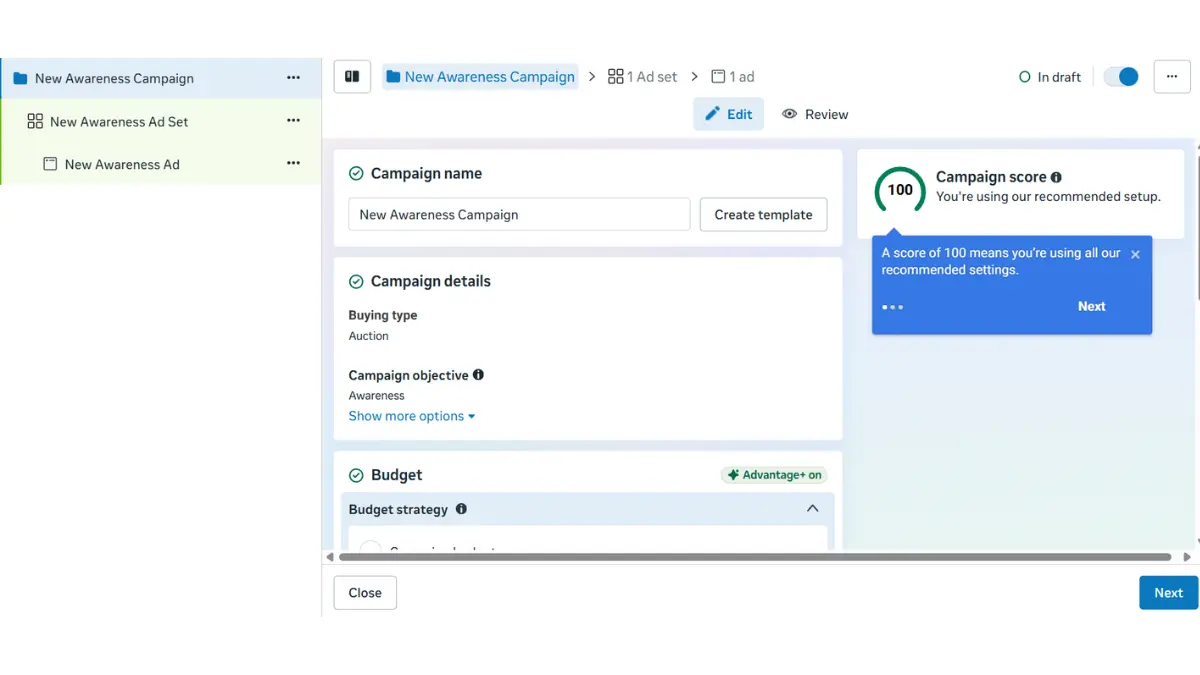
The 3-Level Campaign Structure (Campaign → Ad Set → Ad)
Before you run any campaign, you need to understand the key components of Facebook Ads. Meta organises every ad campaign into three levels:
Level 1: Campaign
This is where you set your campaign objective, which defines what goal you want your ads to achieve. In 2026, Meta offers six main campaign objectives:
- Awareness: Reach a broad audience
- Traffic: Drive users to your website or app
- Engagement: Get more likes, comments, shares
- Leads: Collect contact information
- App Promotion: Drive app installs
- Sales: Generate direct purchases or conversions
Level 2: Ad Set
Within the campaign, the Ad Set is where you define:
- Target Audience (demographics, interests, behaviours)
- Ad Placements (where your ad appears)
- Budget & Schedule (daily or lifetime budget, start and end dates)
Level 3: Ad (Creative)
The Ad level is the actual content your audience sees. It includes:
- Image or video — the visual that stops the scroll
- Primary text — the copy above the image (first 2 lines are most important)
- Headline — the bold text below the image
- Description — optional supporting text below the headline
- Call-to-action button — “Learn More”, “Shop Now”, “Get Quote”, “Download”
The Meta Pixel: Why You Must Install It First
The Meta Pixel is a small piece of code you paste into your website’s header. It tracks what visitors do after seeing or clicking your ad: page views, add-to-cart, form submissions, and purchases.
Without the Pixel, Meta’s AI is flying blind. It cannot see which audience segments convert, so it cannot optimise your campaigns for results. With the Pixel running, the algorithm learns from every conversion and continuously improves your targeting automatically.
In 2026, Meta updated the Pixel with AI-powered automatic setup. It now detects your product catalogue and business type and pre-configures key events. For WordPress sites, install the Pixel using the official Meta for WordPress plugin or through a tag manager. Shopify users can connect directly through the Meta sales channel.
How Much Do Facebook Ads Cost? (2026 India + Global)
The most common question from beginners. It depends on your industry, audience, and creative quality. But here are the real numbers for 2026.
| Metric | India (avg) | Global (avg) | What affects it |
| CPC (Cost per click) | ₹2 – ₹15 | $0.50 – $2.00 | Ad quality, audience size, niche |
| CPM (per 1,000 impressions) | ₹40 – ₹120 | $6 – $14 | Time of year, competition, placement |
| CPL (Cost per lead) | ₹30 – ₹300 | $1 – $10 | Industry, offer quality, landing page |
| Minimum daily budget | ₹100/day | $5/day | Set in the Ad Set level |
| Recommended beginner budget | ₹500–₹1,000/day | $10–$20/day | For meaningful test data |
Important 2026 update: new location fees from July 1
Starting July 1 2026, Meta will add location-based fees on ads delivered in certain countries. These fees are determined by where the ad is delivered, not where the advertiser is based. If you are targeting European audiences, factor this into your CPM estimates. Indian advertisers targeting India only are not affected.
Factors that raise your costs:
- Competitive niche: finance, legal, and insurance ads cost more than lifestyle or food content
- Narrow audiences: very small audience pools drive up competition for those impressions
- Low ad quality: poor creative scores increase CPM and CPC
- Seasonal spikes: Diwali, Christmas, and major sale seasons significantly raise costs
- Learning phase: new campaigns spend slightly more in the first 3–7 days while the algorithm learns
Facebook Ads vs Google Ads
This is the most common debate in paid advertising. The short answer: they solve different problems. Here is the key difference.
| Factor | Facebook Ads | Google Ads |
| Targeting | Demographics, interests, behaviours, lookalikes | Keywords, search queries, purchase intent |
| User mindset | Browsing — not actively searching | Actively searching for a solution |
| Creative need | High visuals and copy must stop the scroll | Low — text ads work well |
| Best for | E-commerce, lifestyle, B2C, brand building | B2B, high-intent buyers, local services |
| Speed to results | Hours (traffic starts immediately) | Hours (but bidding is more competitive) |
| Budget efficiency | Lower CPCs for awareness and leads | Higher CPC but higher purchase intent |
The best digital marketers use both. Facebook Ads for top-of-funnel awareness and lead generation. Google Ads to capture people who are already searching for exactly what you sell. Together, they form a complete paid advertising funnel.
Why Use Facebook Ads for Your Business?
Understanding why use Facebook Ads for your business will help you decide whether this platform is the right fit for your marketing goals. Here are the top reasons:
- Massive Reach: With over 3 billion active users daily, no other platform offers this level of scale.
- Precise Targeting: You can target users based on hundreds of criteria, including location, interests, income, life events, and even custom audiences from your customer list.
- Affordable for All Budgets: You can start running ads with as little as ₹100 per day or $5 per day, making it accessible to startups and small businesses.
- Multiple Ad Formats: From videos and carousels to lead forms and story ads, there is a format for every business type and goal.
- AI-Powered Optimization: Meta’s AI improvements in Q4 2025 led to a 3.5% increase in ad clicks on Facebook and more than a 1% gain in conversions on Instagram. These numbers are expected to keep improving in 2026.
- Detailed Analytics: Meta Ads Manager provides you with comprehensive performance data, including impressions, clicks, conversions, cost per result, and ROAS (Return on Ad Spend).
Benefits of Facebook Ads
The benefits of Facebook Ads extend beyond just reach. Here is why thousands of businesses choose Facebook advertising as their primary growth channel:
- Retargeting Capability: Re-engage people who visited your website but did not make a purchase.
- Lookalike Audiences: Find new customers who resemble your existing ones.
- Cross-Platform Reach: Your ad can appear on Facebook, Instagram, Messenger, and the Meta Audience Network from a single campaign.
- Speed: Unlike SEO, which can take months, Facebook Ads can generate traffic within hours of launching.
- Brand Awareness at Scale: Meta’s Lattice system, which combines multiple surfaces into a unified model, resulted in a 12% increase in ad quality. This means ads are more relevant, useful, and enjoyable for users.
- Affiliate & Creator Integration: Facebook introduced Affiliate Partnerships in March 2026. This allows creators to tag products directly in posts and Reels, so users can tap, view, and purchase without leaving the platform, creating new revenue channels for brands.
How to Create Facebook Ads
Now let’s get practical. Here is a simple step-by-step overview of how to create Facebook Ads for beginners in 2026:
Step 1: Set Up a Facebook Business Page
You cannot run ads without a Facebook Business Page. Create one at facebook.com/pages/create and fill in your brand details, logo, and contact information.
Step 2: Open Meta Ads Manager
Go to adsmanager.facebook.com and click on “Create” to start a new campaign.
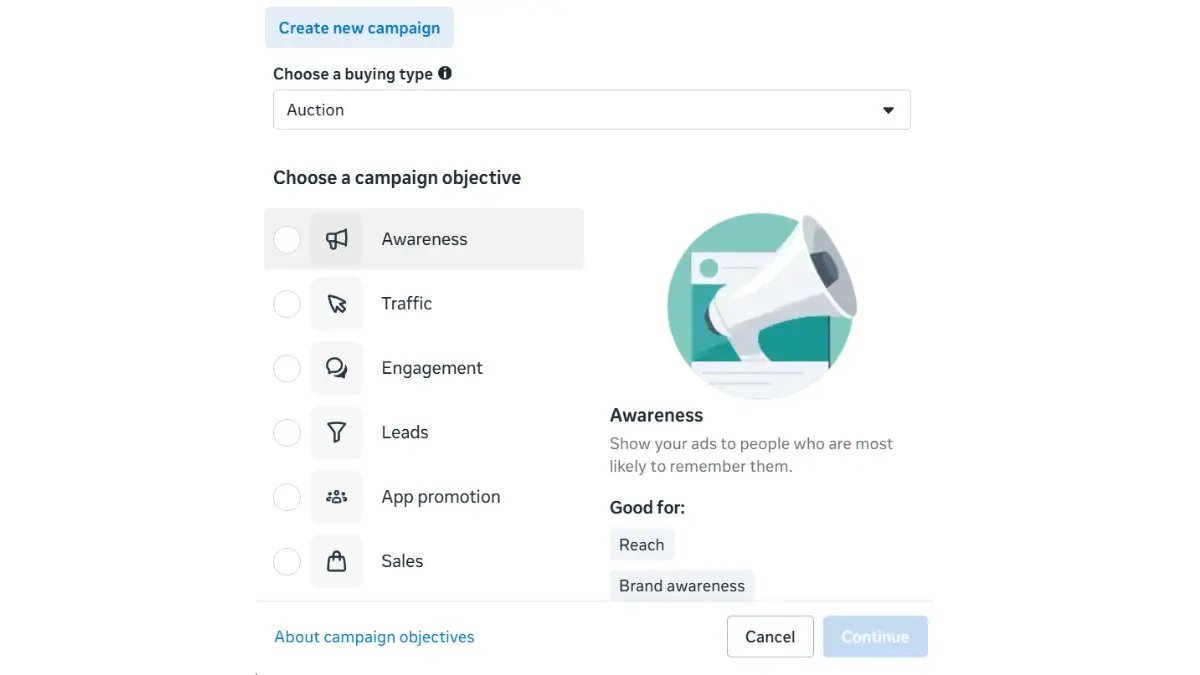
Step 3: Choose Your Campaign Objective
Select the goal that matches your business: Awareness, Traffic, Leads, or Sales.
Step 4: Define Your Target Audience
Set your audience by location, age, gender, interests, and behaviours. You can also upload a Custom Audience from your customer list or create a Lookalike Audience.
Step 5: Choose Ad Placements
In 2026, the recommended option is Advantage+ Placements; let Meta’s AI decide where to show your ad for the best results. Limiting placements manually reduces the algorithm’s effectiveness.
Step 6: Set Your Budget and Schedule
Choose between a Daily Budget (how much you spend each day) or a Lifetime Budget (total spend throughout the campaign).
Step 7: Create Your Ad Creative
Upload your image or video, write your main text, headline, and description, and add a Call-to-Action (CTA) button like “Learn More,” “Shop Now,” or “Get Quote.”
Step 8: Review and Publish
Check everything in the preview pane, look for errors, and click Publish. Your ad will enter the review process and usually goes live within a few hours.
What’s New in Facebook Ads in 2026?
Meta is quickly changing its advertising platform with AI at the centre. Here are the key 2026 updates every advertiser should know:
- Manus AI Integration: Meta has added Manus AI Integrations for Meta Ads Manager, Instagram, Instagram Creator Marketplace, and WhatsApp Business; this brings a powerful AI work partner into your advertising workflow.
- Generative Ad Model (GEM): Meta is moving toward a future where advertisers simply provide a product URL, budget, and basic prompt; AI will generate the entire campaign, including images, copy, headlines, and animations.
- Threads Ads: Threads now supports App Ads globally via the Marketing API, allowing app install and event optimization campaigns without needing new creatives.
- New Attribution Metrics: Click-through attribution now counts only real link clicks, while other interactions like likes, shares, and saves are tracked separately in a new category called “Engage-through attribution.”
- Instant Form Editing: You can now edit Instant Forms directly in Meta Ads Manager, which was not possible before.
Facebook Ads Launch Checklist for Beginners (25 Points)
Go through this checklist before publishing each campaign. It helps you avoid common and costly beginner mistakes.
Before you create the campaign
- Create and fill out your Facebook Business Page (name, logo, contact, about section)
- Install the Meta Pixel on your website and verify that it is firing correctly
- Create a Meta Business Suite account and link it to your Page
- Add a payment method to Meta Ads Manager
- Ensure the campaign objective matches your actual goal (Traffic, Leads, or Sales)
Ad Set setup
- Make sure the audience is broad enough (at least 500,000 people for most niches)
- Set location targeting correctly—city, state, or country as needed
- Age range matches your actual customer profile
- Select Advantage+ Placements (avoid manual placement restrictions)
- Daily budget set at ₹500+ / $10+ for meaningful test data
- Ensure the campaign does not end before you collect enough data (at least 7 days)
Ad creative
- Use an image sized at 1200x628px (Feed) or 1080x1920px (Stories/Reels)
- Limit text on the image to no more than 20% (heavy text reduces reach)
- Create a video that is at least 15 seconds long with captions (80% of users watch without sound)
- Start the primary text by stating the problem or benefit—not your brand name
- Make the headline specific and focused on benefits (avoid vague phrases like “Best Products”)
- Match the CTA button to the ad goal (“Learn More” for traffic, “Get Quote” for leads)
- Preview the ad on mobile before publishing
Post-launch checks
- Avoid making any changes in the first 7 days (this disrupts the learning phase)
- Check the CTR after Day 3—if it is below 0.5%, consider updating the creative
- Monitor frequency—if it is above 3 after 2 weeks, create new ad variations
- Track the landing page bounce rate alongside ad performance
- After receiving 50+ results, duplicate the best performing ad set and increase the budget by 20% increments
Frequently Asked Questions (FAQ)
Q1. What is Facebook Ads in simple words?
Facebook Ads is a paid advertising tool from Meta that allows businesses to show ads to specific groups of people on Facebook, Instagram, and Messenger. These groups are based on interests, age, location, and behaviour.
Q2. Are Facebook Ads free or paid?
Creating a Facebook Page is free. However, you need a budget to run Facebook Ads. You can start with as little as ₹100 per day or $5 per day.
Q3. Are Facebook Ads worth it in 2026?
Absolutely. With Meta’s AI improvements, the Andromeda algorithm, and better targeting, Facebook Ads in 2026 offer a better return on investment than ever, especially for e-commerce and local businesses.
Q4. What is the difference between boosting a post and Facebook Ads?
Boosting is a simple ad tool for beginners with limited targeting options. Facebook Ads through Meta Ads Manager gives you full control over your campaign goals, advanced audience targeting, A/B testing, and detailed analytics.
Q5. How long does it take for Facebook Ads to work?
Typically, Facebook’s algorithm needs 3 to 7 days and at least 50 conversions in the learning phase to fully optimize your ads. Be patient and avoid making major changes during this time.
Related Guides on Marketyug
Facebook Ads is one part of the digital marketing ecosystem. Read these next:
- What is Digital Marketing in simple words
- How to Learn Digital Marketing Step by Step
- What is content marketing and why is it important?
Conclusion
Now you have a complete understanding of Facebook Ads, from the basics to the latest updates in 2026 from Meta. Whether you are a first-time advertiser or looking to improve your skills, this guide covers everything you need to get started confidently.
To recap, Facebook Ads is a smart advertising system that helps you reach the right people with the right message at the right time and within a budget that suits your business.
Start small. ₹500 a day is enough to learn. Run Traffic campaigns before Sales campaigns. Install the Pixel before spending a single rupee. And remember, the Andromeda algorithm is on your side. The better you understand your customer, the better your creative will be, and the better Meta’s AI will work for you.
At MarketYug, we aim to make digital marketing simple, practical, and effective for all business owners and marketers. If you found this guide helpful, share it with someone who might need it. Ready to launch your first Facebook Ad? Start today with a small budget, test your ideas, and let Meta’s AI handle the hard work.
This is a really helpful guide for anyone starting with Facebook Ads and Meta Ads. I especially liked how the article explains the basics in simple language without making things too technical. The beginner-friendly tips make it easier to understand campaign setup, targeting, and ad performance. A useful resource for small businesses and marketers looking to get started with paid social advertising.