How to Create an Amazon Affiliate Account in 2026
How to create an Amazon affiliate account: Go to affiliate-program. amazon. In (India) or affiliate-program.amazon.com (global), click on Sign Up, log in with your Amazon account, add the details of your website or YouTube channel, fill in your Associates profile and payment information and submit. You get instant temporary access and a unique Associate ID. You must generate 3 qualifying sales within 180 days for full approval. The entire sign-up process takes about 15 minutes and is completely free.
Let me be honest with you.
When I first applied for Amazon Associates, I had no idea what I was doing. I spent two hours trying to figure out which URL to visit, what to write in the profile section, and why my SiteStripe toolbar was not showing up. Nobody told me the small things that matter, like making sure your website has at least 10 original posts before you apply, or that you have exactly 180 days to make your first three sales before Amazon closes your account.
I learned all of this the slow way. This guide is the shortcut I wish I had.
Whether you have a blog, a YouTube channel, or you are still setting things up, I will walk you through every step of creating your Amazon affiliate account in 2026, including the parts that most guides skip entirely.
What Is the Amazon Affiliate Program?
Amazon Associates is Amazon’s own affiliate program. When you sign up with them, you get a unique affiliate link to any Amazon product. You will get a commission each time someone clicks your affiliate link and buys a product.
The program is free to join, easy to set up, and trusted worldwide. This is why it’s used by millions of digital marketers across the world. At MarketYug, I always recommend the Amazon Associates program to my students. The reason behind this recommendation is that you do not have to make a product. Instead, you will promote existing products.
Here is why I recommend it as the starting point for every beginner at Marketyug:
- Zero investment required: you promote existing Amazon products, not your own.
- Trusted brand: your readers already trust Amazon, which makes conversions easier.
- Massive product range: you can find affiliate products in almost any niche.
- Works for India and globally: separate programs for Amazon. in and amazon.com.
- Instant temporary approval: you get your Associate ID and can start creating links within minutes.
Amazon Associates rewards content creators who build genuine audiences and recommend products honestly. If you focus on helping your readers choose the right product, the commissions will come naturally.
Who Can Join Amazon Associates in 2026?
Before you start the sign-up process, check that you meet these requirements. Amazon reviews every account, and an application that does not meet these criteria will be rejected.
- An active website or blog: at least 10 published original posts before you apply
- A YouTube channel: must have original videos and a clear topic focus
- A mobile app: available on Google Play or the App Store
- Use paid-to-click or incentivised traffic
- Contain adult, violent, or hateful content
- Be an empty site with no published content
| The 180-day rule the most important thing to know before you apply Amazon gives you instant temporary approval when you sign up. But full approval only comes after you generate 3 qualifying sales within 180 days. If you miss that window, Amazon closes your account, and you must reapply from scratch — and any unpaid earnings are forfeited. Plan your content strategy before applying, not after. |
Before You Apply, Get Your Platform Ready
Spend 30 minutes on this before you touch the sign-up form. A prepared application converts to approval far more reliably than a rushed one.
- At least 10 original blog posts: real, helpful articles with substance, not placeholder content
- A proper About page: explains who you are and what your site covers. Amazon reviewers check this.
- A Contact page: with a working email or contact form
- A Privacy Policy page: Amazon requires this. Free generators are available for WordPress.
- An affiliate disclosure: a clear statement that your content contains affiliate links. Required by Amazon and by law.
- A clean, professional design: does not need to look expensive, just intentional and real
For Marketyug readers: if your site already has the About, Contact, Privacy Policy, and Affiliate Disclosure pages, which you should have from your WordPress setup, you are ready to apply today.
How to Create an Amazon Affiliate Account in 7 Steps
Here is the exact process I followed when I first signed up.
Step 1: Visit the Amazon Associates Homepage
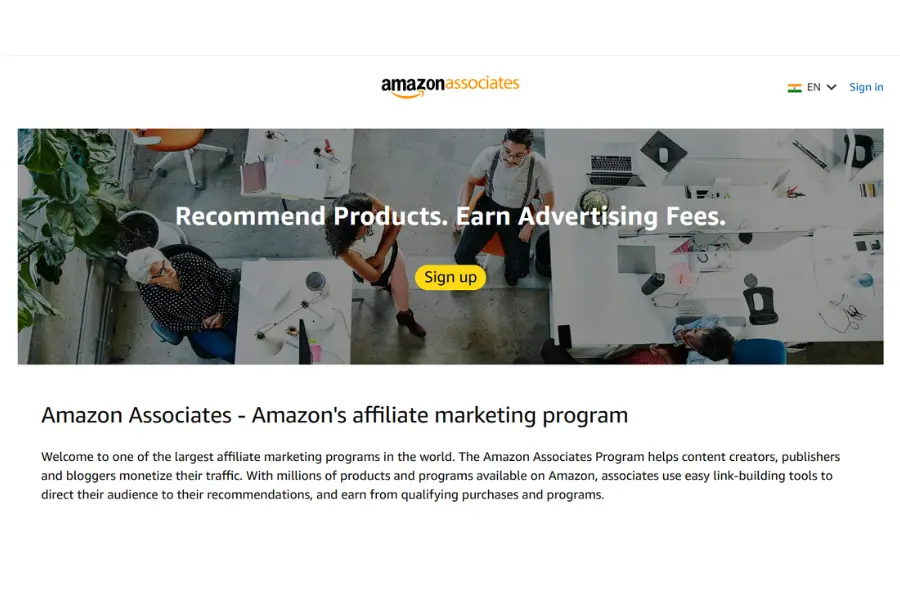
Just type affiliate-program. amazon.in (for Indians) or affiliate-program.amazon.com (for the US and the world). Click on the ‘Sign Up’ button in the top right corner of the page.
Step 2: Log In or Create an Amazon Account
If you already have an account with Amazon, you can simply log in with the same details. However, if you don’t have one, you need to click on ‘Create your Amazon account,’ fill in the required details such as your name, email, and password. I recommend you use the same account you use for shopping.
Step 3: Enter Your Account Information
After you have logged in, you will be directed to the Associates registration page. Fill in the details as follows:
- Payee name – This is your name or the company’s name.
- Address – This is the address where you want the payment to be sent.
- Phone number – This is for verification.
Make sure you fill in the details accurately. Any mistake in the details might cause delays in the payment.
Step 4: Add Your Website or App
In the next step, you’ll be asked to add your website, YouTube channel or mobile app. You can add a maximum of 50 URLs. I added my blog first. Even if your website is new, don’t worry; you are eligible to apply for Amazon Associates. Make sure your website has at least 10 to 15 original posts published.
Step 5: Set Up Your Amazon Associates Profile
In this step, you’ll be asked to:
- Select a Store ID (a unique ID, usually your blog or brand name; I entered “marketyug”)
- Describe your website and what kind of content you publish
- Describe how you drive traffic to your website
- Describe how you plan to monetize your website
Please answer these questions honestly because Amazon will use these answers to determine whether your application meets its guidelines for inclusion in the Amazon Associates Program.
Step 6: Enter Your Payment and Tax Information
The next step is to enter your payment information. Amazon offers the following payment options:
- Direct Bank Transfer (NEFT for India)
- Gift Card (for Associates in India without a qualifying bank)
- Check (for some countries)
If you’re in India, you might need to provide the details of your PAN card. In the case of US-based creators, you need to provide the details of the W-9 form. This step is crucial as you won’t be able to withdraw the commission without completing it.
Step 7: Get Your Associate ID and Dashboard Access
After completing all the previous steps, you’re granted temporary approval and a unique ID as an Amazon Associate (e.g., marketyug-21 for India). This means you’re now officially part of the Amazon Associates program. The dashboard displays the clicks, orders, earnings, and conversion rates.
How to Create an Amazon Affiliate Link
Now that your account is ready, the most important skill you need is knowing how to create an Amazon affiliate link. There are two main ways to do this.
Method 1: Using the SiteStripe Toolbar
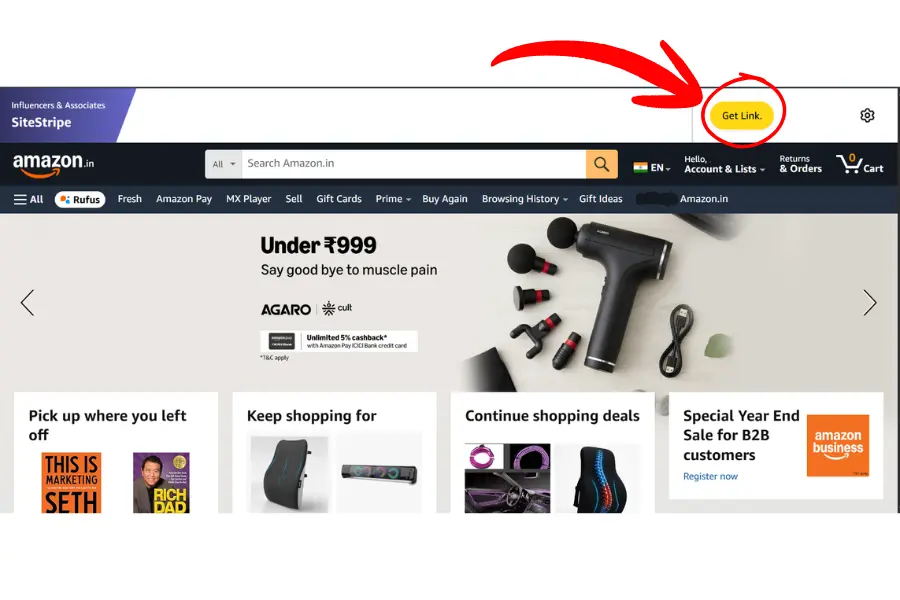
Once your account is approved and you are logged into Amazon, you will see a grey bar at the top of every Amazon page called SiteStripe. This is the easiest way to get your affiliate links.
Here’s what I do:
- Search for the product I want to promote on Amazon.
- Open the product page.
- Look for the SiteStripe Toolbar running across the top of the page
- Click “Text” to get a plain text link, or “Image” to get a product image with an embedded link.
- Copy the short link and use it in your blog post or video description.
The link will automatically include your Associate ID, so every click gets tracked to your account.
| 2026 SiteStripe note SiteStripe does not appear on all browsers, especially with ad blockers or privacy extensions active. If SiteStripe is missing, disable your ad blocker for Amazon pages, or switch to Chrome with extensions off. This is the most common SiteStripe issue in 2026. |
Method 2: Using the Amazon Associates Dashboard
If SiteStripe does not appear, which happens on some browsers, you can manually create links inside your Associates dashboard.
- Log in to your associate’s account.
- Click on “Product Linking” in the top menu.
- Select “Product Links.”
- Search for the product by name or ASIN (Amazon’s product identifier).
- Click “Get Link” and copy your unique URL.
I prefer SiteStripe for speed, but the dashboard method is great when I am creating content in bulk.
The 24-hour cookie: when someone clicks your affiliate link, Amazon tracks their session for 24 hours. If they buy anything on Amazon in that window, not just the product you linked, you earn the commission. If they add your linked product to their cart, the cookie extends to 90 days for that specific item.
How to Make Money with Amazon Affiliate
Getting the account and links is just the beginning. The real question is: how to make money with Amazon affiliate consistently?
Here’s what has worked well for many creators and me at MarketYug:
1. Write product review articles.
Product reviews generate the most sales for affiliate marketing. When someone searches for “best wireless earphones under ₹2000,” they are ready to buy. A well-written, honest review with your affiliate link can earn you commissions every day.
2. Create Comparison Posts
“Product A vs Product B” articles attract buyers deciding between two items. I’ve seen these posts perform really well because the reader is already in decision mode.
3. Build a Niche Website
Instead of trying to cover everything, focus on one niche, like home kitchen tools, fitness gear, or tech gadgets. A niche site builds authority faster, ranks better on Google, and converts more reliably.
4. Use YouTube
If blogging isn’t your style, product review videos on YouTube are very effective. You can include your Amazon affiliate link in the video description. Viewers who click and buy earn you a commission. Many creators use both a blog and YouTube for maximum reach.
5. Grow an Email List
Once visitors arrive on your blog, get their email by offering a free resource like a checklist or guide. Then send them product recommendations with your affiliate links. Email marketing works better than social media because you’re connecting directly with someone who already trusts you.
Amazon Affiliate Commission List: How Much Can You Earn?
Understanding the Amazon affiliate commission list is important before you pick a niche. Not all product categories pay the same rate.
Here’s a simplified breakdown of standard Amazon Associates commission rates (these may vary slightly by region and time):
| Product Category | Commission Rate | Strategy note | |
| Luxury Beauty & Skincare | Up to 10% | High commission, smaller audience, best for dedicated beauty blogs | |
| Fashion & Apparel | Up to 9% | Strong in India, ethnic wear and footwear review posts convert well | |
| Furniture & Home Decor | Up to 8% | Good for lifestyle and home improvement blogs | |
| Outdoor & Sports | Up to 7% | Fitness and adventure niches work well here | |
| Books | Up to 5% | Low per-unit commission but very high search volume | |
| Grocery & Gourmet | Up to 5% | Repeat purchases make this a consistent earner | |
| Electronics (general) | Up to 4% | Lower rate, but extremely high search volume and conversions | |
| Cameras | Up to 3% | High product prices offset the lower rate | |
| Mobile Phones | 1-2% | A veryc low rate is only worth it with massive traffic volume | |
| Video Games & Consoles | Up to 1% | Not recommended for beginners | |
From my experience, electronics and mobile phones have lower commissions, but they sell in huge volumes. Fashion and lifestyle products have higher commissions but smaller audiences. The sweet spot is finding a niche with decent commissions and strong search demand.
Amazon Associates Policy: Rules You Must Not Break
These violations can get your account permanently suspended, which means losing all pending earnings.
| Never click your own affiliate links. Amazon detects self-clicks using IP tracking and device fingerprinting. Even clicking once to “test” can trigger a review. To test your link, ask a friend to click it. |
| Never place affiliate links inside emails. Amazon explicitly prohibits affiliate links in email newsletters. You can link to a blog post in your email — and that post can contain affiliate links — but the affiliate link itself must not be in the email body. |
| Always disclose your affiliate relationship. Every page, post, or social media content with affiliate links needs a clear disclosure near the top. “This post contains Amazon affiliate links” is sufficient. |
| Complete your first 3 sales within 180 days. No exceptions. Note your application date, set a reminder at day 120 as a halfway warning, and ensure your buyer-intent content is live and promoted before the clock runs out. |
Pre-Launch Checklist: Before You Place Your First Affiliate Link
- Website has at least 10 original, published blog posts
- About page is written and explains who you are and your topic
- Contact page is live with a working email or form
- Privacy Policy page is published
- Affiliate Disclosure page is created and linked in your site footer
- Website loads correctly on mobile and desktop
- Applied at the correct URL — amazon. In India, amazon.com for global
- Store ID matches your brand name
- Profile questions answered honestly and specifically
- Payment details entered — PAN and bank account (India) or W-9 (US)
- Associate ID confirmed and dashboard bookmarked
- 180-day deadline noted with a reminder set at day 120
- SiteStripe toolbar is visible when logged into Amazon
- Test link created and confirmed it includes your Associate ID
- Affiliate disclosure added at the top of every post with affiliate links
- No affiliate links placed inside email newsletters
- All links open correctly on mobile
- At least 2 buyer-intent posts published before applying
- Promotion plan in place — WhatsApp groups, Instagram, Quora, or email list
- Internal links from other posts pointing to your affiliate content
Related Guides on Marketyug
Amazon Associates is one piece of the bigger picture. Read these next:
- How to Make Money with Affiliate Marketing
- How to Learn Digital Marketing Step by Step
- What is Content Marketing
- What is SEO and How Does It Work
Frequently Asked Questions
1. What is the Amazon affiliate program, and how does it work?
Amazon Associates is Amazon’s official affiliate program. You promote products using a unique link. When someone clicks your link and buys a product on Amazon within 24 hours, you earn a commission on that sale.
2. How long does it take to get approved for Amazon Associates?
You get temporary access right after signing up. Full approval happens after you generate 3 qualifying sales within 180 days. If you don’t reach that goal, Amazon will close the account, and you’ll need to reapply.
3. What is the minimum payout for Amazon Associates in India?
For NEFT (direct bank transfer), the minimum payout is ₹2,500. If you choose the Amazon Gift Card option, the minimum is ₹500.
4. Can I join Amazon Associates without a website?
Yes. Amazon allows YouTube channels and mobile apps as qualifying platforms. However, a blog or website gives you greater flexibility for publishing content and placing affiliate links.
5. How many websites can I add to one Amazon Associates account?
You can add up to 50 websites, YouTube channels, or apps under one Amazon Associates account.
6. What is the Amazon affiliate commission rate for electronics in India?
Electronics typically earn up to 4% commission. Mobile phones earn even less, at 1–2%, while categories like Fashion & Apparel and Luxury Beauty can pay up to 9–10%.
7. Can I share Amazon affiliate links on WhatsApp or Instagram?
Yes, you can share affiliate links on social media platforms like Instagram, Facebook, and WhatsApp. However, Amazon’s policy does not allow the use of affiliate links in emails. Always disclose your affiliate relationship wherever you share links.
8. What happens if I click my own Amazon affiliate link?
Amazon’s system detects self-clicks, which can lead to the permanent suspension of your account. Never click your own affiliate links, even to test them.
9. How do I create an Amazon affiliate link for a specific product?
You can use the SiteStripe toolbar at the top of every Amazon product page when you’re logged into your Associates account. Click “Text” to copy your unique affiliate link. Alternatively, you can use the Product Links section in your Associates dashboard.
10. How much can a beginner realistically earn with the Amazon affiliate program?
Earnings vary widely based on your niche, traffic, and content quality. Beginners with a focused niche blog usually earn ₹1,000–₹5,000 per month in the first 3–6 months. With consistent SEO content and traffic growth, many creators can scale to ₹20,000–₹50,000 per month or more.
Final Thoughts from MarketYug
I hope this guide has helped you get a clear idea of how to create an Amazon affiliate account and what to do after getting approved. It is a simple process, but your success relies on the content you create for your audience.
Creating an Amazon affiliate account takes 15 minutes. Building a blog that earns consistently takes 3 to 6 months of focused work. That gap is where most beginners give up — and where the ones who stay win.
The process is simple: sign up, get your Associate ID, write buyer-intent content, drive traffic, earn commissions. But each step requires consistency. One review post a week. One new audience channel every month. One honest recommendation at a time.
If you want to understand the complete basics before creating your account, I recommend reading my detailed guide on How to Start Affiliate Marketing. In that blog, I explain how I choose a niche, create content, and build a strategy to earn consistently. It will help you connect the full process from starting affiliate marketing to creating your Amazon affiliate account.
As I mentioned before, at MarketYug, I believe affiliate marketing is one of the easiest ways to make money online for beginners; however, you need to treat it as a real business and focus on providing your audience with the right products and honest recommendations to achieve success and earn money as an affiliate marketer.
Don’t get discouraged if you don’t see immediate results; every successful affiliate marketer started exactly where you are right now.