
What is On-Page SEO? Simple Guide for Beginners + Checklist (2026)
On-page optimization is the process of optimizing pages to improve their performance on Google and increase their click-through rate (CTR). This includes the title tag, description, heading tags, placement of keywords, content, internal links, and alt tags, among others, which are all elements on the page that you have direct control over to make sure Google understands what the page is about and who it is for.
Here is a scenario you have probably faced. You write a blog post on a topic you know well. You publish it and then wait. Nothing happens. Three months later, a competitor’s post on the same topic appears on page one of Google. You have read it, but it’s not better than yours. So, what did they do differently?
On-page SEO is not about tricks or shortcuts. It involves presenting your content in a way that Google can read, understand, and trust. This is the difference between a great blog post that nobody sees and a good blog post that ranks on page one.
In this guide, I will walk you through every on-page SEO factor, explaining what it is, why it matters, and sharing real before-and-after examples you can apply to your own posts today.
What is On-Page SEO?
On-page SEO includes:
• Title tags, which are the headlines that appear in Google search results
• Meta description, which is the summary text that appears below your title in search results.
• Headings (H1–H4), the structure of your content
• Keyword placement, where and how often your target keyword appears
• Content quality and depth, how thoroughly you answer the searcher’s question
• URL structure, the web address of your page
• Internal linking: links to other pages in your own website
• Image optimization including filenames, alt text, and compression
• Search intent matching, whether your content answers what the person was actually looking for
Think of on-page SEO like a job application. Google is the employer, and your page is the candidate. On-page SEO ensures your CV is clearly formatted, uses the right keywords, and shows you are qualified before the interview even starts.
Why is On-Page SEO Important?
On-page SEO is the one area of SEO that you can control completely. You cannot make another website link to you. You cannot speed up how quickly Google indexes your site. But you can optimize every single element on your page right now, for free.
Here is why this matters directly for a blog like Marketyug:
If your page is about on-page SEO but your title says “blog post March 2026” and your headings are unclear, Google has no clear signal about what your content covers. On-page SEO provides those signals.
Even if you rank on page one, a weak title means people will scroll past your link. Your title tag and meta description serve as your ad in Google’s search results. A 1% improvement in click-through rate from position 5 can double your monthly traffic.
If someone searches “what is on-page SEO” and your post is a product page trying to sell an SEO tool, Google will not rank it, regardless of your keyword density. Matching search intent is now one of the most important factors for on-page SEO.
Google’s Helpful Content Update rewards pages that fully answer a question. A 2,000-word post that covers every angle of a topic will outrank a 4,000-word post that repeats the same points. Depth, not length, is the goal.
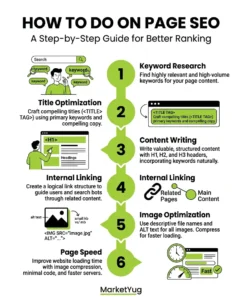
How to Do On-Page SEO (Step-by-Step)
Let’s go through every on-page factor. For each one, I will show you exactly what to do and provide a real before/after example so you can see the difference clearly.
Step 1. Optimize your title tag
Your title tag is the blue clickable headline in Google search results. It is the most important on-page SEO element. Google uses it to understand your page’s topic, and searchers use it to decide whether to click.
Rules for a strong title tag:
- Include your primary keyword near the start, not buried at the end.
- It should be less than 60 characters to avoid truncation on search results pages.
- Add a power word: Simple, Free, Beginner, Explained, Examples, Checklist, 2026.
- Make it specific; tell people exactly what they will get.
| ✗ Before What Is On Page SEO? Complete Beginner Guide for 2026 | ✓ After What is On-Page SEO? Simple Guide for Beginners + Checklist (2026) |
| 💡 Why: The improved version adds “Simple” (targets beginner intent), “+ Checklist” (signals actionable value), and keeps the keyword at the front. The parenthetical makes it scannable in search results. | |
Step 2. Write a compelling meta description
Meta descriptions don’t directly affect your web page’s ranking. However, they do have a direct impact on click-through rates. A poor-quality meta description will result in a low click-through rate.
Rules for a strong meta description:
- Keep it between 140 and 160 characters.
- Include your primary keyword naturally.
- Mention a specific benefit or what the reader will learn.
- Finally, add some easy-to-use appeal: “Learn in 5 minutes,” “Get started today,” “Free guide.”
| ✗ Before Learn about on-page SEO in this complete guide for beginners. | ✓ After On-page SEO explained step-by-step – titles, keywords, headings, internal links, and images. Free 30-point checklist included. Perfect for beginners. |
| 💡 Why: “Step by step”, “30-point checklist”, and “Perfect for beginners” all speak directly to the searcher’s intent and add concrete value that the original description lacks. | |
Step 3. Use one clear H1 heading
Your H1 is the main heading on your page. It is the large title visitors see when they land on your post. There should be exactly one H1 per page. It should include your primary keyword and match (or closely mirror) your title tag.
Most WordPress themes automatically make your post title the H1. Confirm this in your Rank Math or Yoast analysis. It will flag if your H1 is missing or if you have multiple H1s.
| ✗ Before On Page SEO | ✓ After What is On-Page SEO? Simple Guide for Beginners + Checklist (2026) |
| 💡 Why: The original H1 is too vague — Google cannot tell what this page is about. The improved H1 includes the primary keyword, clarifies the audience (“Beginners”), and signals the content format (“Checklist”). | |
Step 4. Structure your content with H2 and H3 headings
Headings are not just for visual organization. They tell Google what each section of your content is about. Well-structured headings help Google pull your content as featured snippets and understand the depth of your coverage.
The right heading structure for a blog post:
- H1: Your post title (one per page).
- H2: Main sections; each should cover a distinct subtopic.
- H3: Subsections within each H2 section.
- H4: Used sparingly for deeper sub-points.
A quick test: If you read only your H2 headings in order, they should tell a complete story about your content. If they do not make sense without the body text, rewrite them.
Step 5. Place your keyword strategically
Keyword placement matters more than keyword frequency. Google does not count how many times your keyword appears; it looks at where it appears and whether it is used naturally.
The five places your primary keyword must appear:
- Within the first 100 words of your post (the opening paragraph or featured snippet block).
- In your H1 heading.
- In at least one H2 heading.
- In your image alt text (for at least one image).
- In your URL slug.
Aim for a natural keyword density of around 0.5 to 1%. For a 2,000-word post, that means your primary keyword appears roughly 10 to 20 times, including variations and synonyms, not just the exact phrase.
| ✗ Before “In this article we will talk about a very important SEO concept. Many people do not understand it. It is something every blogger should know…” | ✓ After “On-page SEO is the process of optimising individual web pages so they rank higher on Google. In this guide, you will learn every on-page SEO technique — with examples…” |
| 💡 Why: The improved version puts the primary keyword in the first sentence. Google gives more weight to keywords that appear early in the content, which signals immediately that your page is directly relevant to that query. | |
Step 6. Optimize your URL slug
Your URL slug is the part of your web address that identifies the specific page. A clean, keyword-focused slug helps both Google and readers understand what the page is about at a glance.
| ✗ Before marketyug.com/?p=1690 or marketyug.com/blog-post-march-2-2026 | ✓ After marketyug.com/what-is-on-page-seo |
| 💡 Why: Short, keyword-focused slugs rank better and are more likely to be shared. Remove stop words (is, the, a, and, for) from your slug. Once a post is published and indexed, do not change the slug — it breaks existing links. | |
Step 7. Match search intent perfectly
Search intent is the most underrated on-page SEO factor. Google’s job is to show the most relevant result for a query. If your content does not match what the searcher actually wanted, no amount of keyword optimization will help you rank.
The four types of search intent:
| Intent type | What the searcher wants | Content format to use |
| Informational | To learn something (“what is on-page SEO”) | Blog post, guide, explainer |
| Navigational | To find a specific website (“Rank Math login”) | Homepage or specific landing page |
| Commercial | To compare options (“best SEO tools”) | Comparison post, list, review |
| Transactional | To buy something (“buy Rank Math Pro”) | Product or sales page |
For Marketyug, almost every blog post targets informational intent. Your readers want to learn, so your content should teach, explain, and provide examples, not pitch products.
Step 8. Write content with depth and clarity
Content depth means covering a topic sufficiently so the reader does not need to go back to Google and search again. Google tracks this; if users click your result and immediately return to search, it signals that your content did not satisfy them.
How to improve content depth for Marketyug posts:
- Ensure that the answer to the main question posed by your topic appears in the first paragraph. This way, readers do not have to search for the definition.
- Cover every relevant subtopic with its own H2 or H3 heading.
- Add real examples, such as before/after comparisons, screenshots, or case studies.
- Use simple language; your audience is beginners. Write at a class 8 reading level with short sentences and short paragraphs.
- Add a summary or takeaway at the end of complex sections.
Step 9. Optimize images
Every image you upload to WordPress is an on-page SEO opportunity that most beginners ignore. Google cannot see images; it reads the file name and alt text to understand what the image shows.
| ✗ Before File name: screenshot123.jpg Alt text: (empty) Format: PNG, 450KB | ✓ After File name: what-is-on-page-seo-title-tag-example.webp Alt text: “Example of an optimised title tag for on-page SEO” Format: WebP, 68KB |
| 💡 Why: The improved version gives Google three useful signals: the file name tells it what the image shows, the alt text confirms it, and the WebP format improves page speed. Empty alt text is a wasted ranking opportunity on every image. | |
Quick image optimization rules:
- Rename every image before uploading; use your keyword and describe what the image shows.
- Add descriptive alt text to every image; write it as a sentence, not a keyword list.
- Convert all images to WebP format (use ShortPixel or Imagify plugin).
- Set image dimensions in Elementor to prevent layout shift, which affects Core Web Vitals.
Step 10. Build internal links
Internal links connect your blog posts. They do three important things: they help Google crawl all your pages, they pass authority between posts, and they keep readers on your site longer.
For Marketyug, your SEO posts should form a tight cluster:
- “What is SEO” links to On-Page SEO, Off-Page SEO, Technical SEO.
- “What is On-Page SEO” (this post) links to Technical SEO, Off-Page SEO, How to Do SEO, What Are Backlinks.
- “How to Do SEO” links back to all three SEO type posts.
| ✗ Before “You should also learn about technical SEO. Click here to read more.” | ✓ After “On-page SEO works best when you have a strong technical foundation. Read our guide on what is technical SEO to make sure your site is crawlable and fast before you optimise your content.” |
| 💡 Why: “Click here” tells Google nothing. The improved version uses descriptive anchor text (“what is technical SEO”), gives the reader context for why they should click, and adds a keyword-rich link that signals relevance to Google. | |
Step 11. Target featured snippets
Featured snippets are the answer boxes that appear at the top of Google search results, above position 1. They get a major CTR boost because they appear before everything else.
Your content can already target snippets if you rank between positions 5 and 30. To target them:
- Paragraph snippets: Provide a direct and concise answer of 40 to 60 words to a question formulated in the H2 heading. For instance, “What is a title tag?”
- List snippets: Format your how-to steps or component lists as clear bullet points or numbered lists. Google pulls these directly.
- Table snippets: Format comparisons and data as HTML tables. Google loves pulling comparison tables into featured snippet slots.
For Marketyug, the featured snippet block at the top of this post is your paragraph snippet bid for “what is on-page SEO.” The search intent matching table above is your table snippet bid for “types of search intent.”
Step 12. Demonstrate E-E-A-T
E-E-A-T stands for Experience, Expertise, Authoritativeness, and Trustworthiness. It is Google’s framework for deciding whether a website deserves to rank for important topics.
For a beginner digital marketing blog, here is how to show E-E-A-T without a big team or years of experience:
- Add a detailed author bio below every post; include your name, your background, and what makes you qualified to write about this topic.
- Cite your sources; link to official Google documentation, Ahrefs studies, or Search Engine Journal when making factual claims.
- Include real examples from your own experience; saying “when I audited my Technical SEO post, I found…” is more trustworthy than vague generalities.
- Add a “last updated” date to your posts; this signals freshness, which matters for SEO topics that change often.
- Use HTTPS, have an About page, and show contact details; these are basic trust signals that Google’s quality raters check.
On Page SEO Techniques That Actually Work
Here are some proven on-page SEO techniques you should focus on:
1. Search Intent Matching
Understand the difference between Informational, Transactional, and Navigational Intent.
2. Content Depth
Long content works if it is useful.
3. Semantic SEO
Using related content is helpful.
4. Featured Snippet Optimization
Using:
- Lists
- Tables
- Definitions
5. Schema Markup
Using structured data is helpful.
On Page SEO Best Practices
Here are expert-level on-page SEO best practices:
✔ Write for Humans First
Search engines reward helpful content.
✔ Demonstrate Experience
Include real examples and insights.
✔ Build Author Authority
Include author bio and credentials.
✔ Add FAQs
Improve topical relevance.
✔ Use Trust Signals
- HTTPS
- Contact details
- About page
At MarketYug, we use all these strategies in every campaign.
On Page SEO Optimization Checklist
Title tag & meta description
- Primary keyword appears within the first 3 words of the title tag
- Title tag is under 60 characters (check with Rank Math green indicator)
- Title includes at least one power word: Simple, Free, Beginner, Guide, Checklist, Examples, 2026
- Meta description is 140–160 characters
- Meta description includes the primary keyword naturally
- Meta description mentions a specific benefit or what the reader will learn
Headings & structure
- There is exactly one H1 on the page — no more, no less
- H1 includes the primary keyword
- H2 headings cover all main subtopics of the post
- At least one H2 includes a variation of the primary keyword
- H3 headings used for subsections within H2 sections
- Reading only the H2 headings tells a complete story about the content
Keyword & content
- Primary keyword appears in the first 100 words of the post
- Primary keyword used naturally 1–2 times per 200 words (avoid stuffing)
- Semantic keywords and related terms used throughout (e.g. “on-site SEO”, “search optimisation”)
- Search intent matches the post format — informational query = educational post
- Content fully answers the searcher’s question — no need to go back to Google
- Short paragraphs (2–4 sentences max) for mobile readability
- Featured snippet block added as first paragraph for definition queries
URL, images & links
- URL slug is short, lowercase, and keyword-focused (e.g. /what-is-on-page-seo/)
- URL slug contains no dates, numbers, or auto-generated characters
- Every image has a descriptive file name (not “IMG_4521.jpg”)
- Every image has descriptive alt text including the keyword where natural
- All images compressed and in WebP format
- Post has 3–5 internal links to related Marketyug posts
- Internal links use descriptive anchor text — not “click here”
- Any external links open in a new tab and point to authoritative sources
E-E-A-T & final checks
- Author bio visible at the bottom of the post
- “Last updated” date shown on the post
- FAQ section added with 5–8 questions (enables FAQ schema in Rank Math)
- Rank Math SEO score is 80 or above before publishing
- Post previewed on mobile in Elementor before publishing
- Post submitted for indexing in Google Search Console after publishing
Common On-Page SEO Mistakes to Avoid
Mistake 1: Keyword stuffing
Writing “on-page SEO is important for on-page SEO because on-page SEO helps…” leads to unnatural repetition, which Google’s algorithm detects and penalizes. Use your keyword naturally, then use synonyms and related terms for the rest of the post.
Mistake 2: Ignoring search intent
A blog post of 3,000 words on “buy SEO audit tool” will not be effective since Google only displays product listings for the keyword. It is always important to verify which results Google shows before embarking on content creation.
Mistake 3: Writing for length, not depth
A 4,000-word post that repeats the same ideas will not outrank a focused 2,000-word post that fully answers the question. Add more sections, more examples, and more data; do not just add more words that say the same thing.
Mistake 4: Empty or missing alt text
Every image without alt text is a missed chance to signal to Google. It takes just 10 seconds per image to add. “On-page SEO title tag example” is much better than leaving it blank.
Mistake 5: Changing your URL slug after indexing
Once Google has indexed your page at a specific URL, changing the slug creates a 404 error that breaks all existing links. If you need to change it, set up a permanent 301 redirect from the old URL to the new one immediately.
Advanced On-Page Strategy
If you want to go beyond basics:
1. Content Clusters
Create topic clusters.
2. Core Web Vitals Optimization
Focus on:
- LCP
- CLS
- INP
3. Content Refresh Strategy
Update old content regularly.
4. User Engagement Signals
Improve:
- Time on page
- Bounce rate
- Scroll depth
EEAT- friendly
Google emphasizes:
- Experience
- Expertise
- Authoritativeness
- Trustworthiness
To align with EEAT:
- Add author bio
- Cite credible sources
- Provide real examples
- Maintain transparency
At MarketYug, EEAT is not optional; it’s mandatory.
Practical Example of On-Page SEO
Let’s apply everything:
If your keyword is what is Digital Marketing:
- Use it in H1
- Mention naturally in the intro
- Maintain 1% density
- Add related secondary keywords
- Optimize images
- Provide comprehensive coverage
That is real on-page SEO optimization in action.
Related Guides on Marketyug
On-page SEO is one part of the complete SEO picture. Read these next to build your full understanding:
- What is Technical SEO
- What is Off-Page SEO
- What is SEO and How Does It Work
- How to Do SEO Step by Step
- What Are Backlinks
Final Thoughts
Now you clearly understand what on-page SEO is and how it directly affects your rankings. By grasping the true meaning of on-page and applying useful techniques and best practices, you can improve visibility.
On-page SEO is the foundation of every piece of content you publish. Before you consider backlinks or social media promotion, your post needs to be optimized on the page itself. This includes a clear title, a strong meta description, proper headings, strategic keyword placement, and internal links.
The good news is that every element in this guide is completely within your control. You don’t need a budget or a developer. Just follow a systematic approach, tackling one post at a time. Start with your posts that receive the most impressions in Google Search Console.
These are the pages Google shows to people but doesn’t get clicks for. Apply the checklist to each one. The improvements will add up over time.
Frequently Asked Questions (FAQ)
1.What is the difference between on-page SEO and off-page SEO?
On-page SEO includes everything you optimize directly on your web page, such as titles, headings, content, keywords, internal links, and images. Off-page SEO involves everything that happens outside your page, mainly backlinks from other websites. Both are important, but on-page SEO should come first. There is no point in building backlinks to a poorly optimized page.
2.How many keywords should I use per blog post?
Focus on one primary keyword per post, along with 3 to 5 secondary keywords (related terms and variations). Use the primary keyword in your title, H1, URL, first paragraph, and at least one H2. Incorporate it naturally throughout the post at about 0.5 to 1% density. Use secondary keywords wherever they fit naturally; don’t force them.
3.How long should a blog post be for on-page SEO?
There is no magic word count. The right length is whatever it takes to fully answer the searcher’s question, no more and no less. For most informational queries in the digital marketing field, 1,500 to 3,000 words is typical. Check the top three ranking pages for your target keyword and try to match or exceed their depth, not just their word count.
4.How do I check if my on-page SEO is working?
Visit Google Search Console and check the Performance report. Look at your impressions (how often your page appears in search), clicks, CTR, and average position. If impressions are increasing but CTR is low, your title and meta description may need improvement. If your position remains around 40 to 80, your content depth and internal links might need work. Check back in 4 to 6 weeks after making changes.
5.Does on-page SEO work without backlinks?
Yes, for lower-competition keywords. If on-page optimization is strong and competition is low, many early blog posts can rank on the first three pages even without backlinks. For competitive keywords where top results have many backlinks, on-page SEO alone might not be enough. However, it is always the necessary first step.
6.How often should I update on-page SEO for old posts?
Review your top posts every 3 to 6 months. Update the title and meta description if CTR has dropped. Refresh the content with new examples or data. Add internal links to any newer, relevant posts. Google rewards freshness. A well-updated post that is 12 months old can often outperform a newly published post on the same topic.
This is a great tip particularly to those fresh to
the blogosphere. Short but very accurate info… Many thanks for sharing this
one. A must read article!
Normally I don’t learn post on blogs, but I would like
to say that this write-up very compelled me to try and do so!
Your writing style has been amazed me. Thank you,
very nice post.