
How to Create an Amazon Affiliate Account (2026 Guide)
So, if you’ve been thinking about making money online, I’m sure you’ve already come across the Amazon affiliate program. It’s one of the most popular methods for bloggers, content creators, and website owners to make money online. I’ve been through the entire process, and in this article, I’ll be taking you through the entire process on how to create an Amazon affiliate account, get your first affiliate link, and start making money even if you’re a complete newbie.
So, if you have a blog, YouTube channel, or even a small, specialized website, the Amazon affiliate program, also known as Amazon Associates, could be a lucrative way for you to make money. Let’s dive into it.
What Is the Amazon Affiliate Program?
Amazon Associates is Amazon’s own affiliate program. When you sign up with them, you get a unique affiliate link to any Amazon product. You will get a commission each time someone clicks your affiliate link and buys a product.
The program is free to join, easy to set up, and trusted worldwide. This is why it’s used by millions of digital marketers across the world. At MarketYug, I always recommend the Amazon Associates program to my students. The reason behind this recommendation is that you do not have to make a product. Instead, you will promote existing products.
Who Can Join Amazon Associates?
Before we proceed to generate Amazon affiliate account credentials, let’s ensure that you are eligible to apply for Amazon Associates. The Amazon Associates are eligible for those who have the following:
- An active website, blog, application, or YouTube channel
- Original content with regular updates
- A clear audience or niche
- No paid-to-click or incentivized traffic
Amazon will review your account once you earn your first few sales. Amazon will approve your account if your traffic sources are genuine; otherwise, they will deny your account, so ensure your platform is ready before applying for Amazon Associates.
Step-by-Step: How to Create an Amazon Affiliate Account
Here is the exact process I followed when I first signed up.
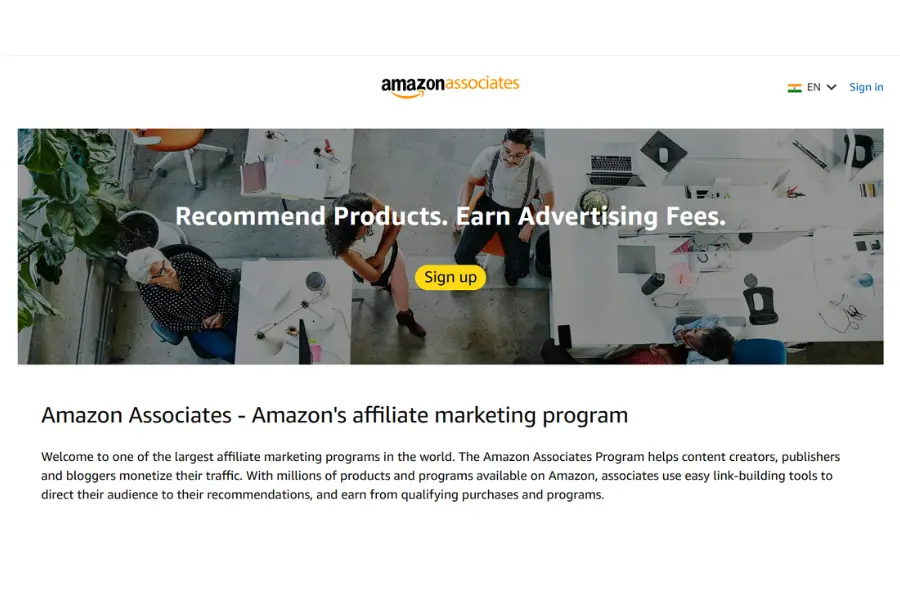
Step 1: Visit the Amazon Associates Homepage
Just type affiliate-program.amazon.in (for Indians) or affiliate-program.amazon.com (for the US and the world). Click on the ‘Sign Up’ button in the top right corner of the page.
Step 2: Log In or Create an Amazon Account
If you already have an account with Amazon, you can simply log in with the same details. However, if you don’t have one, you need to click on ‘Create your Amazon account,’ fill in the required details such as your name, email, and password. I recommend you use the same account you use for shopping.
Step 3: Enter Your Account Information
After you have logged in, you will be directed to the Associates registration page. Fill in the details as follows:
- Payee name – This is your name or the company’s name.
- Address – This is the address where you want the payment to be sent.
- Phone number – This is for verification.
Make sure you fill in the details accurately. Any mistake in the details might cause delays in the payment.
Step 4: Add Your Website or App
In the next step, you’ll be asked to add your website or YouTube channel or mobile app. You can add a maximum of 50 URLs. I added my blog first. Even if your website is new, don’t worry; you are eligible to apply for Amazon Associates. Make sure your website has at least 10 to 15 original posts published.
Step 5: Set Up Your Amazon Associates Profile
In this step, you’ll be asked to:
- Select a Store ID (a unique ID, usually your blog or brand name; I entered “marketyug”)
- Describe your website and what kind of content you publish
- Describe how you drive traffic to your website
- Describe how you plan to monetize your website
Please answer these questions honestly because Amazon will use these answers to determine whether your application meets their guidelines for inclusion in the Amazon Associates Program.
Step 6: Enter Your Payment and Tax Information
The next step is to enter your payment information. Amazon offers the following payment options:
- Direct Bank Transfer (NEFT for India)
- Gift Card (for Associates in India without a qualifying bank)
- Check (for some countries)
If you’re in India, you might need to provide the details of your PAN card. In the case of US-based creators, you need to provide the details of the W-9 form. This step is crucial as you won’t be able to withdraw the commission without completing it.
Step 7: Get Your Associate ID and Dashboard Access
After completing all the previous steps, you’re granted temporary approval and a unique ID as an Amazon Associate (e.g., marketyug-21 for India). This means you’re now officially part of the Amazon Associates program. The dashboard displays the clicks, orders, earnings, and conversion rates.
How to Create an Amazon Affiliate Link
Now that your account is ready, the most important skill you need is knowing how to create an Amazon affiliate link. There are two main ways to do this.
Method 1: Using the SiteStripe Toolbar
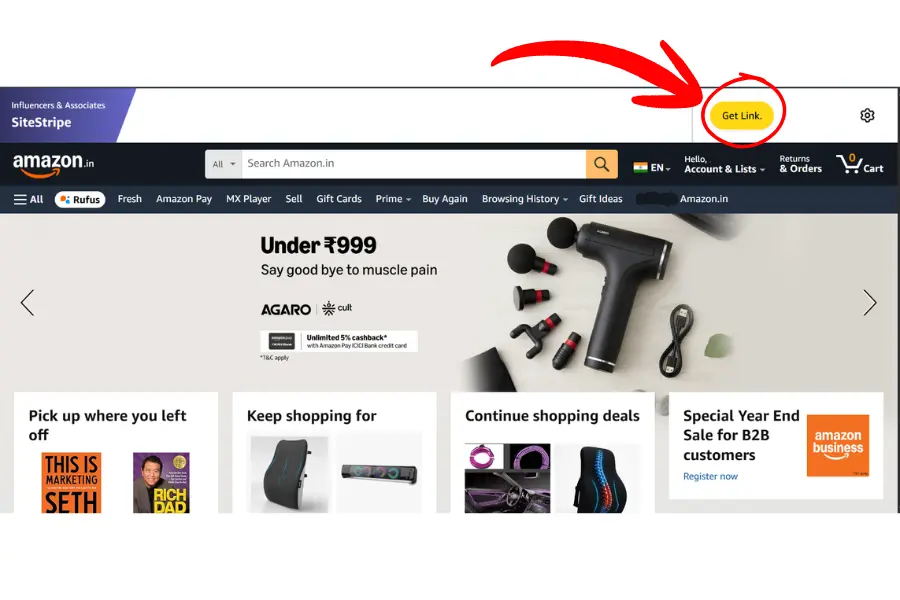
Once your account is approved and you are logged into Amazon, you will see a grey bar at the top of every Amazon page called SiteStripe. This is the easiest way to get your affiliate links.
Here’s what I do:
- Search for the product I want to promote on Amazon.
- Open the product page.
- Look for the SiteStripe Toolbar running across the top of the page
- Click “Text” to get a plain text link, or “Image” to get a product image with an embedded link.
- Copy the short link and use it in your blog post or video description.
The link will automatically include your Associate ID, so every click gets tracked to your account.
Method 2: Using the Amazon Associates Dashboard
If SiteStripe does not appear, which happens on some browsers, you can manually create links inside your Associates dashboard.
- Log into your associate’s account.
- Click on “Product Linking” in the top menu.
- Select “Product Links.”
- Search for the product by name or ASIN (Amazon’s product identifier).
- Click “Get Link” and copy your unique URL.
I prefer SiteStripe for speed, but the dashboard method is great when I am creating content in bulk.
How to Make Money with Amazon Affiliate
Getting the account and links is just the beginning. The real question is: how to make money with Amazon affiliate consistently?
Here’s what has worked well for me and many creators at MarketYug:
1. Write product review articles.
Product reviews generate the most sales for affiliate marketing. When someone searches for “best wireless earphones under ₹2000,” they are ready to buy. A well-written, honest review with your affiliate link can earn you commissions every day.
2. Create Comparison Posts
“Product A vs Product B” articles attract buyers deciding between two items. I’ve seen these posts perform really well because the reader is already in decision mode.
3. Build a Niche Website
Instead of trying to cover everything, focus on one niche, like home kitchen tools, fitness gear, or tech gadgets. A niche site builds authority faster, ranks better on Google, and converts more reliably.
4. Use YouTube
If blogging isn’t your style, product review videos on YouTube are very effective. You can include your Amazon affiliate link in the video description. Viewers who click and buy earn you a commission. Many creators use both a blog and YouTube for maximum reach.
5. Grow an Email List
Once visitors arrive on your blog, get their email by offering a free resource like a checklist or guide. Then send them product recommendations with your affiliate links. Email marketing works better than social media because you’re connecting directly with someone who already trusts you.
Amazon Affiliate Commission List – How Much Can You Earn?
Understanding the Amazon affiliate commission list is important before you pick a niche. Not all product categories pay the same rate.
Here’s a simplified breakdown of standard Amazon Associates commission rates (these may vary slightly by region and time):
| Product Category | Commission Rate |
| Luxury Beauty | Up to 10% |
| Fashion & Apparel | Up to 9% |
| Furniture & Home | Up to 8% |
| Outdoor & Sports | Up to 7% |
| Grocery & Gourmet | Up to 5% |
| Books | Up to 5% |
| Electronics | Up to 4% |
| Cameras | Up to 3% |
| Mobile Phones | 1–2% |
| Video Games | Up to 1% |
From my experience, electronics and mobile phones have lower commissions — but they sell in huge volumes. Fashion and lifestyle products have higher commissions but smaller audiences. The sweet spot is finding a niche with decent commissions and strong search demand.
Important Rules You Must Follow
Amazon takes its policies seriously. Violating them can get your account suspended. Here’s what I always keep in mind:
- Never click your own affiliate links. Amazon will catch this and suspend your account.
- Always disclose your affiliate relationship. You can do this by adding a small disclaimer like “This post contains affiliate links. I may earn a small commission at no extra cost to you.”
- Avoid using affiliate links in emails. This goes against Amazon’s policy in most cases.
- Avoid adult and hateful speech content.
- Complete your first three qualifying sales within 180 days of becoming a member. Otherwise, Amazon will suspend your account.
Tips to Get Approved Faster
If you’re worried about getting approved, here’s what helped me when I started:
- Have at least 10 original blog posts before applying
- Make your website look clean, professional, and real
- Add a proper About page, Contact page, and Privacy Policy
- Add a proper About page, Contact page, and Privacy Policy
- Don’t apply with a completely empty or brand-new site
Final Thoughts from MarketYug
I hope this guide has helped you get a clear idea of how to create an Amazon affiliate account and what to do after getting approved. It is a simple process, but your success relies on the content you create for your audience.
If you want to understand the complete basics before creating your account, I recommend reading my detailed guide on How to Start Affiliate Marketing. In that blog, I explain how I choose a niche, create content, and build a strategy to earn consistently. It will help you connect the full process from starting affiliate marketing to creating your Amazon affiliate account.
As I mentioned before, at MarketYug, I believe affiliate marketing is one of the easiest ways to make money online for beginners; however, you need to treat it as a real business and focus on providing your audience with the right products and honest recommendations to achieve success and earn money as an affiliate marketer.
Don’t get discouraged if you don’t see immediate results; every successful affiliate marketer started exactly where you are right now.